
When I was younger, I never kept any kind of todo lists or calendars. I was able to just remember everything and was opposed to the idea of spending extra energy just to repeat information on paper/into a file. This went so far that I can attest without lying that during my school/high school/college/university days, I never wrote any notes during class if it wasn't mandated by teachers (as often was the case in primary and junior high school). I did just fine without it.
However, the adult life with its responsibilities eventually caught up with me. I was starting to struggle with keeping everything in check. Growing less young didn't help with that, either. However, I still was quite the digital minimalist, and didn't want any extra apps on my computer. The revelation came in the late 2010s when I stumbled upon this blog entry by Jeff Huang. Productivity in a simple txt file? This is cool! I started my everything file on 2020-02-23.
At first, my syntax was very simple. I just added the current date in yyyy-mm-dd on the first line of the document (unlike Huang, I add stuff to the beginning rather than the end of the file) and added tasks and notes on the rows below the date header, tasks preceded by "- " when undone and changed to "+ " when done. This syntax stemmed from the few physical todo lists I had been experimenting with, where I always put a hyphen in front of a task, and when completed, just added a strike through the hyphen to turn it into a plus sign.
The file was still only human-readable at this point. However, as I was starting to get into my career as a localization engineer and learning about computers and language parsing, I was starting to want to make the file computer-parsable as well. I was also aware of the todo.txt ideology, but I've always found their syntax limiting. I wanted to retain full ability to take free-form notes in the same "everything file". I might be misjudging their syntax however, I've not paid much attention after creating my own.
The final piece came together when I acquired a decommissioned Raspberry Pi from my employer. Now, I had an always-on machine in my network, so I set out to make it parse the file for me. I made it look for any open tasks in the everything file and compile me a short todo list with a shell script I've crontabbed to be run every 15 minutes. The script is included later in this post, but first I need to explain the complete current syntax I use:
- unfinished task|2024-06-15|2024-06-01
^                 ^          ^date on which the task becomes relevant and gets added to the todo list (optional)
|                 |deadline of the task (optional)
|marker for unfinished task

+ finished task
	+ subtasks can be indented with a tab
		+ sometimes even multiple levels
-? unfinished idea for a rainy day
+? finished task that was an idea for a rainy day
--just a note
-€ a consumable thing (most often groceries) that I need to buy
+€ purchased consumable
-$ abandoned, unfinished task (doesn't show up in task list any more)
++stN-artist-album
^  ^    ^vinyl record I've played
|  |stylus, with the N being a running count of my styli
|marker for a played vinyl record
The groceries thing was a relatively recent addition, inspired by this post about lists one should keep by the Art of Manliness. And as you can see, I also track stylus playtime/wear with this same file.
So, let's go through the actual shell script that does the parsing. I'm no programmer, and the script could probably be made cleaner by e.g. using actual temporary files for the pivoting steps. However, it works for me, so it's okay. Here goes:
   #!/bin/bash
01 Dropbox-Uploader/dropbox_uploader.sh download sandbox.txt ~/sandbox.txt
02 grep -Eh '^\s*- [^\|]+\|[^\|]+\|' sandbox.txt > sandbox-pivot.txt
03 d=$(date +%Y-%m-%d)
04 awk -F '|' -v date=$d '$3 <= date {print;}' sandbox-pivot.txt > todo.txt
05 grep -Eh '^\s*- [^\|]+\|[^\|]+$' sandbox.txt >> todo.txt
06 sort -t '|' -k 2,2 todo.txt -o todo.txt
07 echo >> todo.txt
08 grep -Eh '^\s*- [^\|]+$' sandbox.txt >> todo.txt
09 echo >> todo.txt
10 grep -Eh '^\s*-\?[^\|]+$' sandbox.txt >> todo.txt
11 grep -Eh '^\s*-€.*?$' sandbox.txt > kauppalista.txt
12 Dropbox-Uploader/dropbox_uploader.sh upload ~/todo.txt todo.txt
13 Dropbox-Uploader/dropbox_uploader.sh upload ~/kauppalista.txt kauppalista.txt
The file itself is located at the root of my Dropbox. I use Dropbox-Uploader to transfer files to and from the Raspberry Pi. So, the first line is just to grab the current status of the everything file (called sandbox.txt) and download it.
The second line takes out all the tasks that have both a deadline and a "beginning on" date and puts them into a temporary file for processing. The third line just stores the current date in the proper format into a variable. On the fourth line, the tasks whose beginning on date is either already passed or on the current date get added to the todo.txt file, which will become the task list for me.
The fifth line adds the tasks that have a deadline but don't have a "beginning on" date into the todo.txt file.
The sixth line sorts all the tasks by deadline. Only tasks with a deadline are in the file at this point.
The seventh line is just a spacer line. All the timed tasks are at the top of the file sorted by deadline, and I wanted an empty line before the non-timed tasks.
The regular, non-timed tasks get added on line eight.
Line nine is, again, a spacer line before the rainy day ideas, which then get added at the end of the file on line 10 of the script.
Line eleven compiles a separate list named "kauppalista.txt" (kauppalista basically meaning 'groceries' in Finnish). I refer to this list when I'm in the grocery store.
Finally, lines 12 and 13 just upload the compiled lists to Dropbox where I can access them on either my PC or my phone.
Speaking about accessing the file, I always have Notepad++ open on my PC. Today, it looked like this:
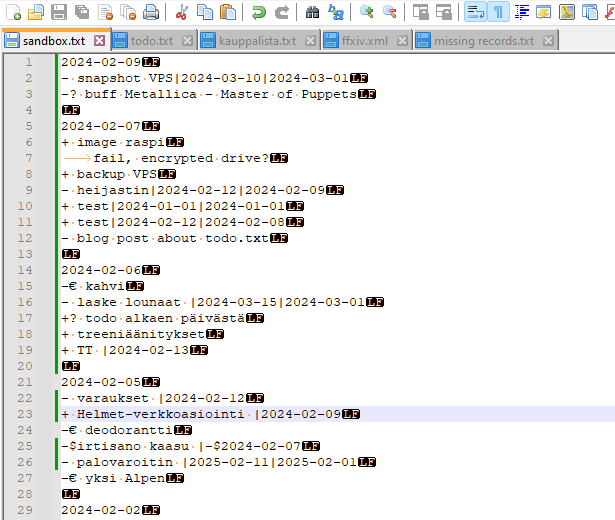
As you can see, I have all three files discussed here open in tabs (and a couple of others you don't need to concern yourself with at the moment). I try to drop any idea or task that comes to mind into the sandbox.txt as soon as it crosses my mind in order not to lose it. I check the todo.txt a couple of times a day (Notepad++ refreshes the file if it has changed underneath) to see if there are any tasks due soon. I also open it if I have a spare moment to see if any of the tasks inspires me at that moment. No use forcing things unless pressed by deadline. If I complete a task, I just triple click the entry on the todo list to be able to search for the string in all open files and jump to the corresponding line in the sandbox.txt to change the hyphen to a plus to mark it done. The item will disappear from the list during the next scheduled run of the script (15 minutes later at maximum).
On my iPhone, I use a text editor called Pretext. It opens up to the root of my Dropbox, where I can either open the groceries list if I'm going to the grocery store or the sandbox file if I get an idea I need to write down when I'm not at my computer. The latter is still a bit clunky, and it takes some willpower to take the phone out to log an idea, especially during winter when you have gloves on (although I wear gloves that have conductive fingertips so I can use the phone wihtout taking the gloves off). Typing on a phone is a pain, so I usually just dictate my idea using speech recognition. I can fix mistakes and formatting later, the main thing is to get the idea down before I forget. This process is the only reason I would ever consider a smart watch. However, the pain of getting the phone out hasn't been sufficiently painful just yet to justify the cost and the pain of putting up with even more of Apple's BS… Maybe if I went out more often…